 Metamoa

Meterview Vol.13
Oh, My Friend Is Studying in the Seat Next to Me Right Now
Just send a friend a link and you can study together in the same room, an online study room you enter right away without signing up: 고요한 독서실
- Words Moazine editors
- Photos 정성윤 (space screens)
English
Moazine’s thirteenth Meterview is “고요한 독서실,” an online study room where you can study together in the same room just by sending a friend a link. 정성윤, who felt while teaching students at a hagwon (private academy) that keeping up focus alone is the hardest part, plans, builds and runs it alone together with AI coding agents like Claude Code and Codex. It brings out the feeling of studying with a friend in the next seat without showing your face or screen, and having started with small rooms, it has now opened a central library with a tall wall of books and big windows too.
Please introduce 고요한 독서실 in one line. How did you start making it?
It’s an online study room you enter right away without signing up, where you can study together in the same room just by sending a friend a link. Teaching students at hagwons, I often felt that ‘staying focused sitting alone at a desk is the hardest thing,’ and I started because I wanted to make a space myself that anyone could leave on and study together in without any burden.
We’re curious what made you think of making an online study room where you study together with friends in the same room.
Going to a study room or a study café is best, but it’s hard to go out every time, and leaving a video call on is a burden, right? I thought that even without showing each other your faces or screens, if there’s just the right amount of tension and solidarity, “Oh, my friend is studying in the seat next to me right now,” your focus goes up a lot.
Is there a reason you made it “same room with just a link,” entered right away without signing up?
When you’ve made up your mind to study and get blocked by steps like signing up, email verification or installing an app, the will to focus cools off right then. I wanted to lower the threshold as much as possible, so that if you just toss one link over KakaoTalk, one click puts you right at a desk.
I wanted to lower the threshold as much as possible, so that if you just toss one link over KakaoTalk, one click puts you right at a desk
정성윤 · maker of 고요한 독서실
What did you pay the most attention to so people can focus quietly while being together?
I focused on bringing out the ‘feeling of studying together’ without disturbing each other.
- Your time keeps counting up even if you lock your screen while studying, but if you leave for another app, the timer stops and your status changes to ‘딴짓 중 (Slacking off).’
- Instead of noisy chatting, I made it so you can quietly send just one “Focus!” alert.
- For people who come in alone, I also added a ‘study mate robot’ feature that sits with you in an empty seat.
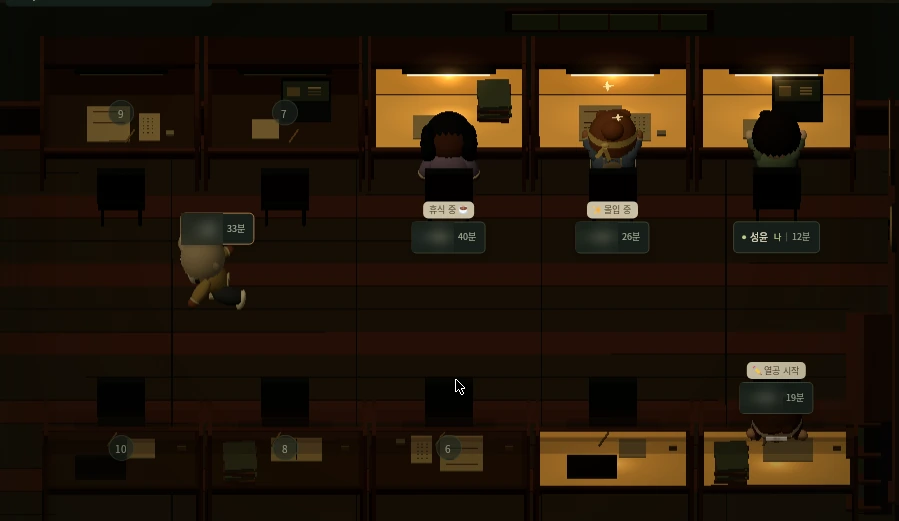
How did you decide on the study room’s mood and spaces?
At first I started mainly with small rooms, and in the recent 2.0 update I newly opened a ‘central library’ space that feels like a university’s central library. You study in Reading Room 1 (42 seats), with its two-storey wall of books and big windows, and when you want a break you can move to the ‘lounge’ with a robot barista and rest; I tried to put the flow and air of a real library into a 3D space.
If there’s a way of studying you recommend to people coming for the first time, please tell us. Good ways to use it with friends are welcome too.
First, come right in without signing up, decorate your character, turn on the timer, then lock your phone screen and study. When using it with friends, I recommend sending an invite link with the copy-link button next to the room name and sitting side by side in the same room or in neighbouring seats in the central library. Since you can see each other’s slacking-off status, you quietly end up slacking off less.

What AI or tools did you make 고요한 독서실 with? We’re also curious whether you made it alone, or how many people worked on it together.
As a one-person developer without a CS background, I plan, develop and run it alone, collaborating with AI coding agents like Claude Code and Codex.
About how many people have visited so far? A rough number is fine.
Even counting only the first day after I recently added admin metrics, visits by about 80-some people (members and non-members included) were recorded. Starting with the web, I’ve finished releasing on the iOS App Store (recently 2.0.1), and a closed test for the official Android release is also in progress.
Is there anything you’d like to add to 고요한 독서실 from here on?
I’m preparing a ‘자리 잠금 (Seat lock)’ feature (linked with Screen Time) that locks other apps you choose when you turn on the study timer, the official Android release, and a feature for casually sharing weekly study time with friends.